

- What: 160-series numbers are TRAI-regulated for BFSI transactional and service voice calls in India.
- You must: Register on Tata DLT and complete Plivo’s header and template provisioning.
- If you don’t: Using them for promotional calls leads to disconnection and penalties.
Overview
160-series numbers are ten-digit telephone numbers designated by the Indian Department of Telecommunications for transactional and service voice communications by regulated BFSI entities.Permitted Use Cases
160-series numbers are for transactional or service-related communication only. Do not use them for marketing or promotional purposes. Acceptable use cases:- Payment reminders and transaction notifications
- Account statements and balance updates
- Service alerts and system notifications related to subscribed services
- Authentication, alerts, customer support, regulatory communication, and service calls
Eligibility
160-series numbers are allocated only to BFSI (Banking, Financial Services, and Insurance) entities that hold a valid licence or registration from a recognized financial regulator. You declare the regulator and licence number on the BFSI Customer Application Form.Roles in 160-Series Provisioning
Self-Managed vs Partner-Managed
There are two possibilities depending on who places the calls:
Both setups use the same steps below; the difference shows up during registration.
TM registration location. Plivo currently accepts 160-series provisioning only when the TM entity is registered in Mumbai or Karnataka. Entities registered elsewhere are not supported today.
DLT operator support. Plivo currently provisions 140 and 160-series numbers exclusively through Tata Teleservices and is in the process of onboarding additional service providers. Entities registered on other DLT platforms (Airtel, Vi, BSNL) are not supported today.
Prerequisites
The BFSI Customer Application Form and the Aggregator Telemarketer Declaration are collected by Plivo during Step 2 below — no separate Plivo KYC is required.
Provisioning Process
Step 1: Tata DLT Registration
Who: PE (and TM, if different) Register on the Tata Teleservices DLT portal:
Tata emails the approved PE certificate (and TM certificate where applicable) to the registered email IDs.
Step 2: Submit Forms to Plivo
Who: PE and TM (you, or your partner)- Download the BFSI Customer Application Form and the Aggregator Telemarketer Declaration.
- Fill in all fields. The BFSI form captures the PE’s regulatory category, governing regulator, licence number, DLT registration ID, and chosen setup (Self-Managed or Partner-Managed). The TM declaration captures the TM’s PAN, CIN, Tata DLT TM ID, and the PE relationship.
- The PE signs and seals the BFSI form; the TM signs and seals the TM Declaration. In Self-Managed, the same legal entity signs both forms in its respective PE and TM capacities.
- Submit both forms to Plivo by emailing them to your Account Manager or raising a Plivo Support ticket with the forms attached.
Step 3: Plivo Allocates the Number and Issues the NOC
Who: Plivo After Plivo validates both forms:- Plivo allocates a 160-series number to your account.
- Plivo issues a No Objection Certificate (NOC) to the TM by replying to the same email or support ticket where the forms were shared. Plivo issues a separate NOC for each number procured.
Step 4: Voice Header Registration
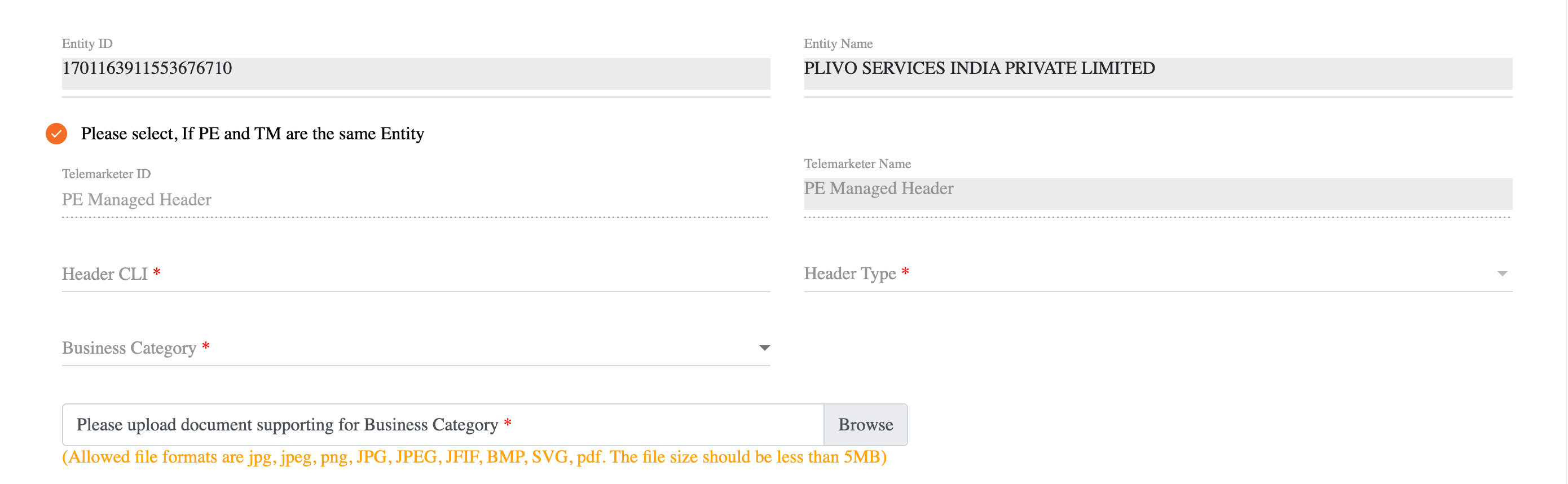
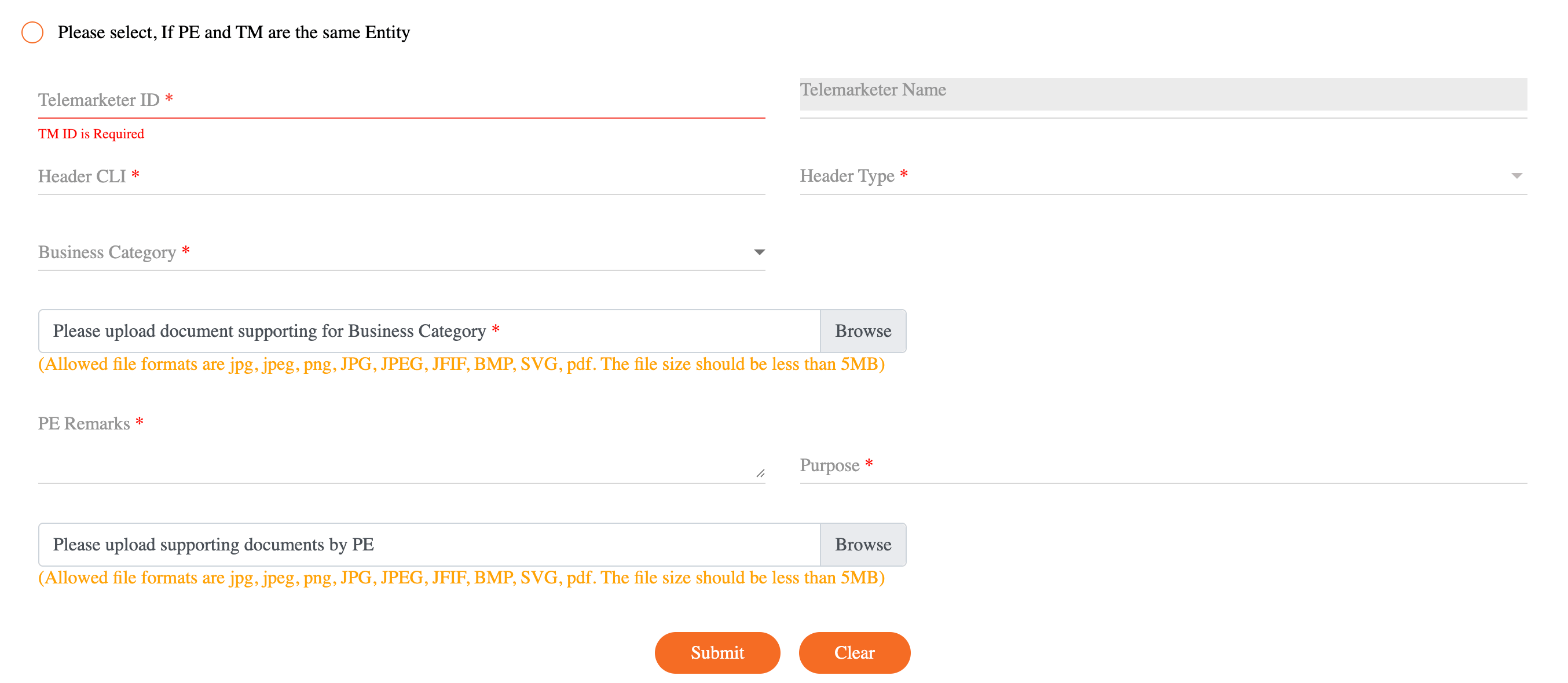
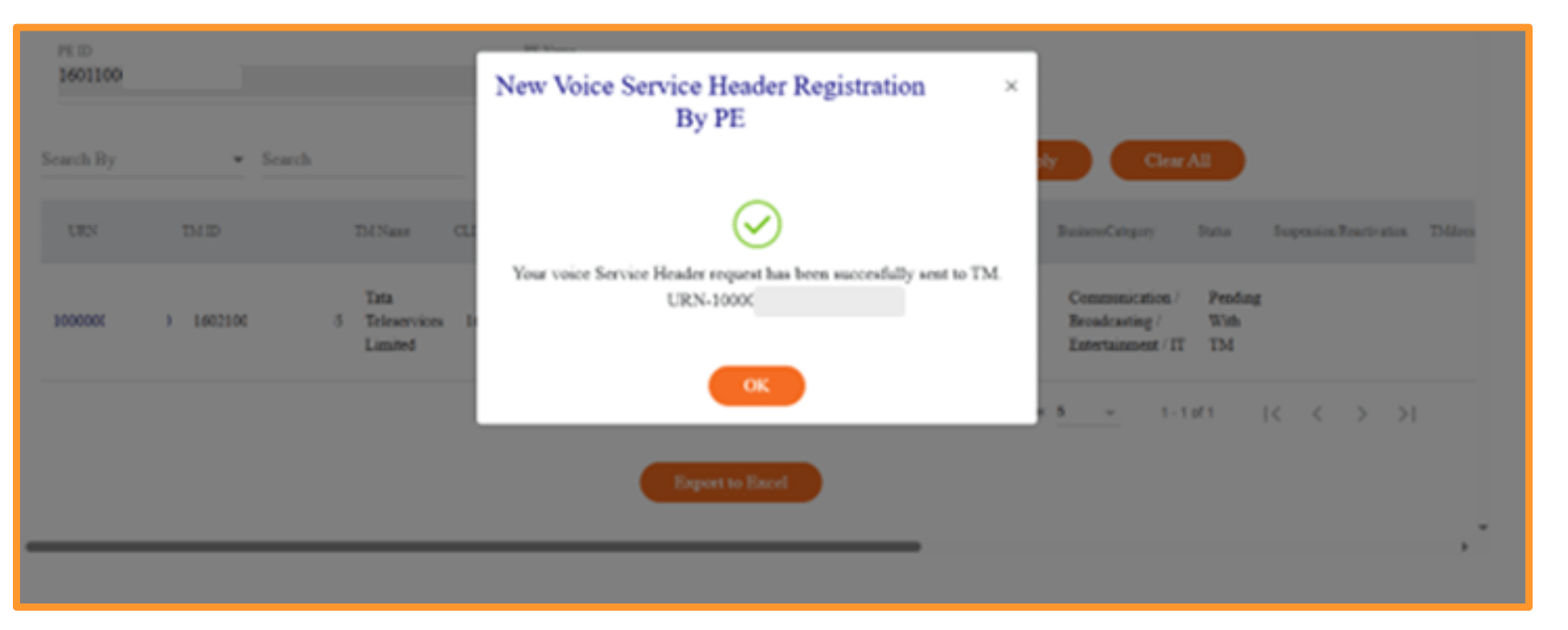
Who: PE (always — in Self-Managed, log in with your PE persona on Tata DLT) The PE logs into the Tata DLT portal and submits the Voice Header registration with these fields:
During registration, the portal asks whether the PE and TM are the same entity:
Step 5: Voice Header Approval by TM (Partner-Managed only)
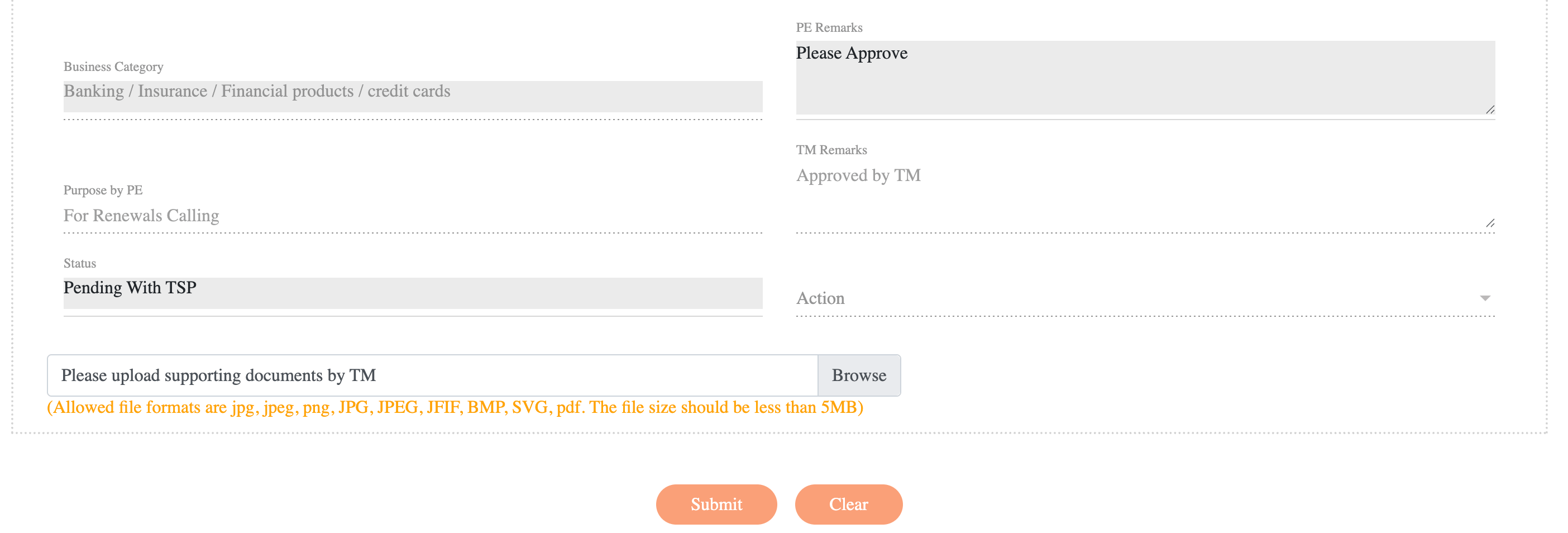
Who: TM — skip this step in Self-Managed In Self-Managed, the Voice Header proceeds directly to Tata review. In Partner-Managed, the TM logs into the Tata DLT portal, opens the pending Voice Header using the URN shared by the PE, and approves it. The TM goes to Voice Header Registration List For TM and reviews the pending request.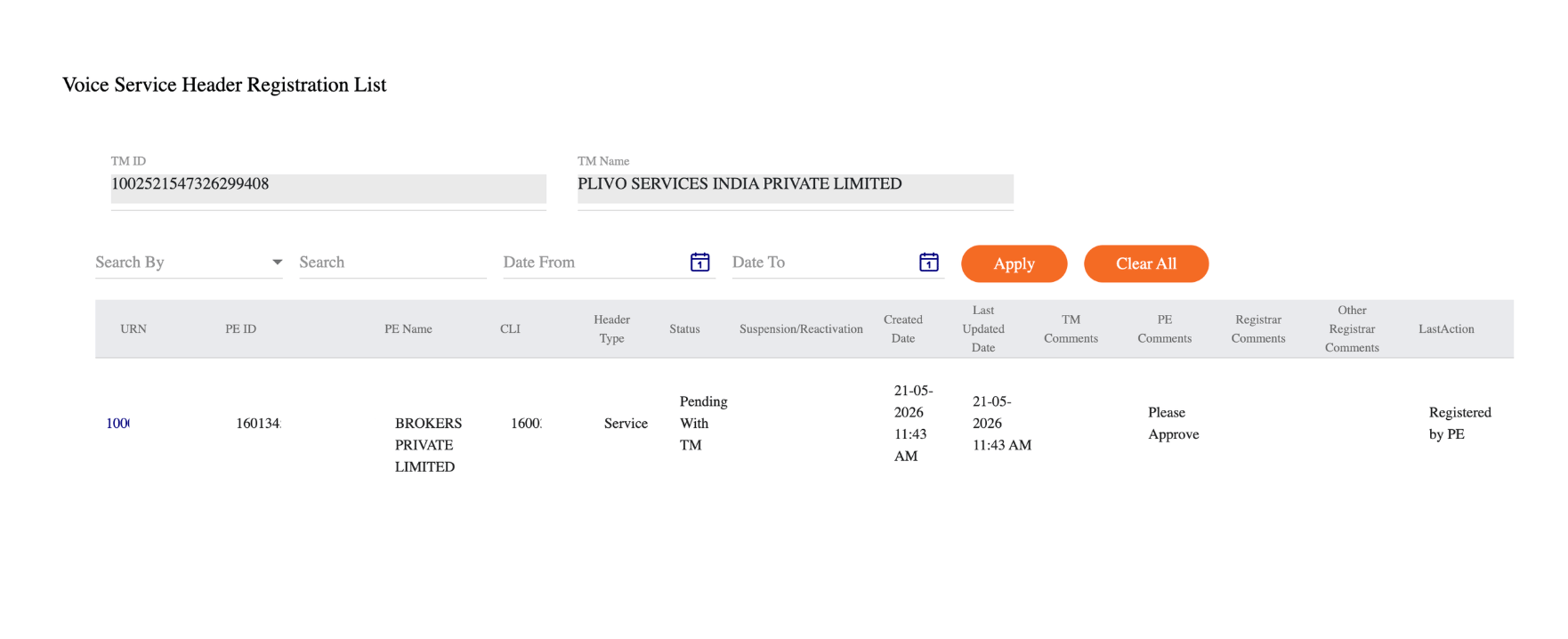
Step 6: Voice Template Registration
Who: PE The PE logs into the Tata DLT portal and goes to Voice > Voice Template Registration by PE. Register a Voice Content Template for each message type you intend to send (for example, payment reminders, OTP delivery, transaction confirmations).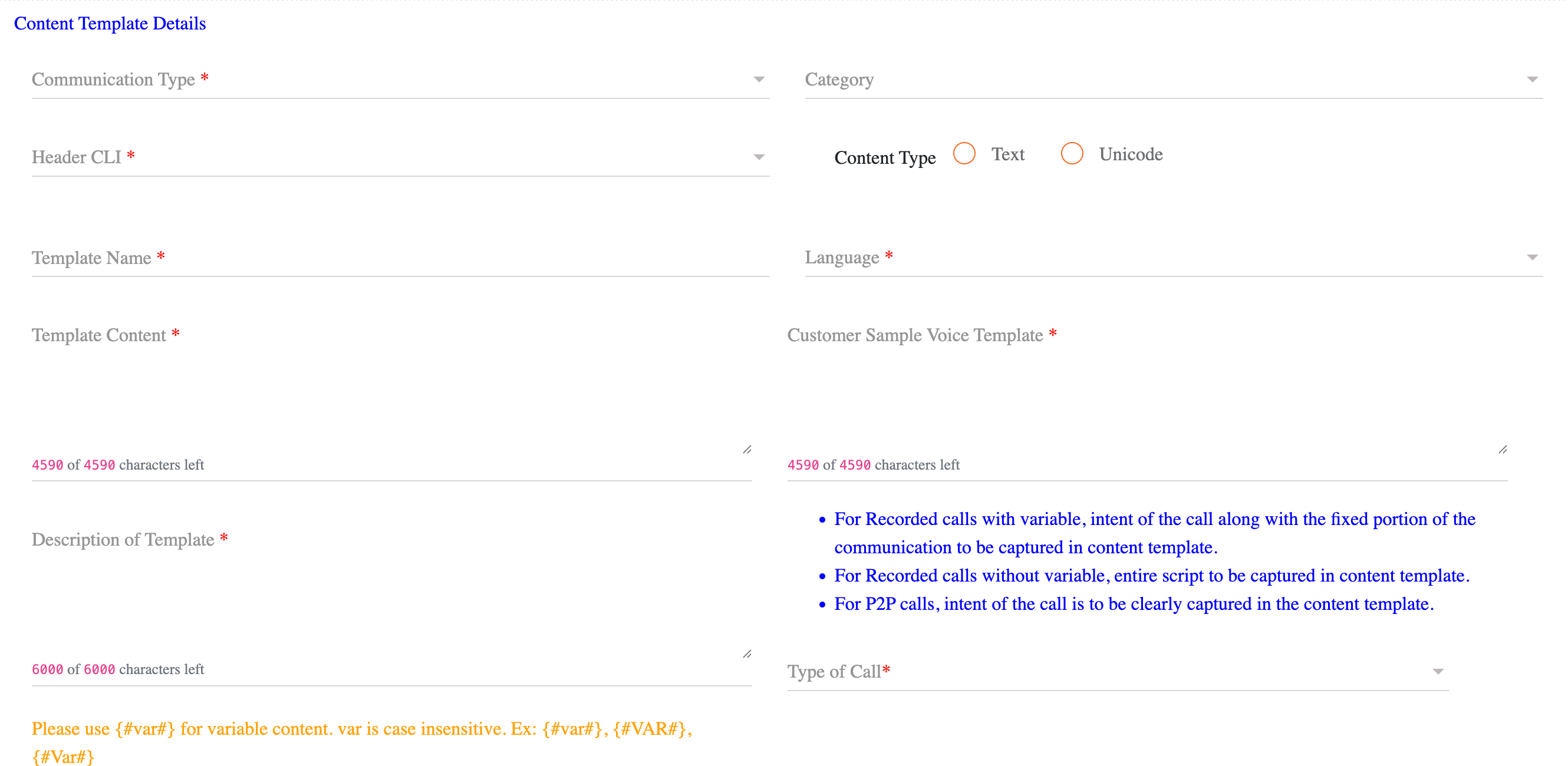
Estimated Timelines
Best Practices
- Maintain compliance documentation — Keep all documents (PE Certificate, TM Certificate where applicable, signed forms, NOCs, regulatory certificates) in a secure, accessible location for audits.
- Monitor DLT portal status — Check the Tata DLT portal regularly for renewal requirements and compliance notifications.
- Test before go-live — Validate Voice Templates and call flows in a test environment before production.
- Stay updated on regulations — Monitor TRAI and DoT announcements for changes to 160-series number regulations.
FAQs
Can I use 160-series numbers for promotional calls?
No. 160-series numbers are strictly for transactional and service communications. Using them for promotional or marketing purposes violates TRAI regulations and can result in number disconnection and penalties.Do I need to submit a new NOC for every 160-series number?
Yes. Plivo issues a separate NOC for each number procured. Upload the relevant NOC during Voice Header registration on the Tata DLT portal.What if my entity is registered on a DLT platform other than Tata?
Plivo currently provisions 160-series numbers exclusively through Tata Teleservices. Register as a Principal Entity on the Tata DLT portal.What happens if my Voice Header registration is rejected?
You receive notification via the DLT portal with the reason for rejection. Common reasons:- Incomplete or incorrect documentation
- Mismatch between PE or TM details and submitted documents
- Invalid NOC or regulatory certificate
Do I need to renew my 160-series numbers?
Yes. Maintain active PE registration (and TM registration where applicable) on the Tata DLT portal and keep all compliance documents current. Check with Tata for renewal timelines on PE registration and content templates.Related
- India Calling Regulations — Regulatory requirements and calling rules
- India Number KYC — KYC documents and number rental process
- 140-Series Numbers — Setup guide for promotional voice numbers
- UCC Management — How Plivo handles UCC complaints
- Plivo Console — Manage your account and numbers
- Plivo Support — Get help with provisioning questions